
Menu
Today we’re going to talk about infographics. And no, they are not dead. In fact, they are way easier than they used to be.
Launch Team – https://www.ScrewTheCommute.com/launchteam
Please watch this short trailer to the end and leave a comment – https://www.facebook.com/AmericanEntrepreneurFilm/videos/558575401181955
AI Hacks – https://www.ScrewTheCommute.com/aihacks
AI Hacks Video Masterclass – https://www.youtube.com/watch?v=miJed0mCFHQ
Subscribe at:


NOTE: Complete transcript available at the bottom of the page.
Screw The Commute Podcast Show Notes Episode 1139
How To Automate Your Business – https://screwthecommute.com/automatefree/

Internet Marketing Training Center – https://imtcva.org/
Higher Education Webinar – https://screwthecommute.com/webinars
See Tom’s Stuff – https://linktr.ee/antionandassociates
[00:23] Tom’s introduction to Infographics [01:40] A lot less complicated than it used to be [04:10] Wide variety of uses for infographics [07:12] You can also generate these for mobile useHigher Education Webinar – https://screwthecommute.com/webinars
Screw The Commute – https://screwthecommute.com/

Screw The Commute Podcast App – https://screwthecommute.com/app/
Screw The Commute Podcast Producer – https://screwthecommute.com/larryguerrera/
College Ripoff Quiz – https://imtcva.org/quiz
Know a young person for our Youth Episode Series? Send an email to Tom! – orders@antion.com
Have a Roku box? Find Tom’s Public Speaking Channel there! – https://channelstore.roku.com/details/267358/the-public-speaking-channel
How To Automate Your Business – https://screwthecommute.com/automatefree/
Internet Marketing Retreat and Joint Venture Program – https://greatinternetmarketingtraining.com/
This is the shopping cart system Tom uses!
Kartra – https://screwthecommute.com/kartra/

Copywriting901 – https://copywriting901.com/

Become a Great Podcast Guest – https://screwthecommute.com/greatpodcastguest
Training – https://screwthecommute.com/training
Disabilities Page – https://imtcva.org/disabilities/
Tom’s Patreon Page – https://screwthecommute.com/patreon/
Tom on TikTok – https://tiktok.com/@digitalmultimillionaire/
Email Tom: Tom@ScrewTheCommute.com
Internet Marketing Training Center – https://imtcva.org/
Many Chat – https://screwthecommute.com/1138/
I discovered a great new headline / subject line / subheading generator that will actually analyze which headlines and subject lines are best for your market. I negotiated a deal with the developer of this revolutionary and inexpensive software. Oh, and it’s good on Mac and PC. Go here: http://jvz1.com/c/41743/183906
The WordPress Ecourse. Learn how to Make World Class Websites for $20 or less. https://screwthecommute.com/wordpressecourse/


SUMMARY BY CHATGPT
Tom Antion explains why infographics are still useful and argues that they are now much easier to create than they used to be, especially with tools like ChatGPT.
The main point is that infographics help people understand information faster because they combine visuals with short explanations. They are often easier to remember, more likely to be saved, and more likely to be shared than plain text.
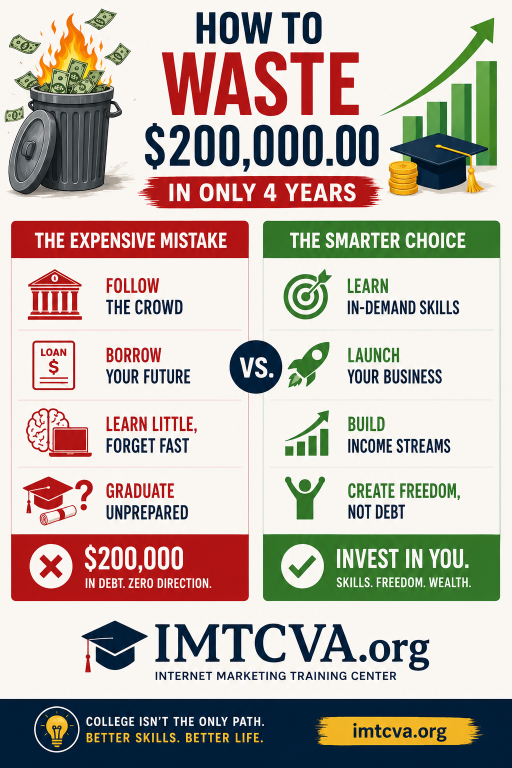
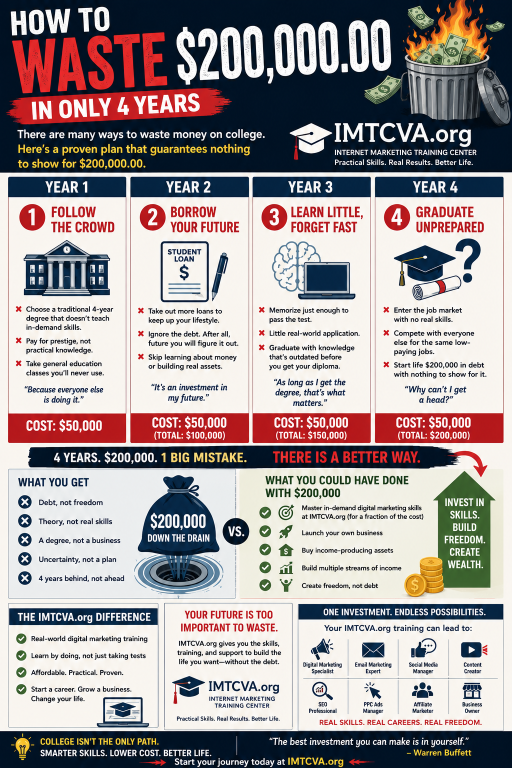
Tom says that years ago, creating infographics required a lot of planning, layout work, graphic design decisions, and careful writing. Now, he says he created two infographics in only a few minutes using ChatGPT. One version had very little text, and the other had more text.
A key takeaway is that there is no universal rule that infographics must have very little text. Tom says some audiences prefer quick visual summaries, while others, especially more technical or analytical audiences, may want more explanation. His advice is to create multiple versions and test them with your own audience.
He lists many possible uses for infographics, including:
• Blog posts
• Pinterest
• LinkedIn
• Facebook
• Instagram
• YouTube Community posts
• Sales pages
• Lead magnets
• Podcast show notes
• Trade show booths
• Email newsletters
• Printed handouts
• Press releases
• Slide decks
Tom also mentions more advanced infographic options, such as animated infographics, interactive infographics, and mobile-optimized infographics.
His example was based on promoting his school, IMTCVA.org. He asked ChatGPT to use information from his school website and related materials to create two infographic versions showing how his school could be an alternative to a traditional four-year college path.
The episode closes with Tom promoting his mentor program and school, emphasizing that infographics can provide months of reusable content from just a few minutes of work.
Main Lesson
Infographics are not dead. They are easier than ever to create, can be reused across many platforms, and should be tested in different formats to see what your specific audience responds to best.
===
Episode 1139 - Infographics
[00:00:08] Welcome to Screw the Commute. The entrepreneurial podcast dedicated to getting you out of the car and into the money, with your host, lifelong entrepreneur and multimillionaire, Tom Antion.
[00:00:24] Hey everybody, it's Tom here with episode 1139 of Screw the Commute podcast. Today we're going to talk about infographics. And no, they are not dead. In fact, they are way easier than they used to be. So that's what we'll talk about today. Hope you didn't miss episode 1138. That was Manychat. I've been using it for about nine years to automate things, and I've kind of ignored it because it's, it runs in the background, but it'll do all kinds of cool stuff. So now I'm up in my game using Manychat and I'll tell you all about it in episode 1138. Anytime you want to get to a back episode, you go to screwthecommute.com/the episode number and pick up a copy of my automation book. screwthecommute.com/automatefree. Version 3.0 is the latest. Grab it if you don't have it. But guess what? I'm halfway to episode or excuse me to version 4.0, which will add a ton to a version 3.0. So go ahead and grab 3.0 if you don't have it, and then watch for 4.0 coming out. And check out my mentor program, greatinternetmarketingtraining.com and my school at IMTCVA.org, certified to operate by SCHEV.
[00:01:41] All right. I taught infographics to my students years and years ago for a long time, but it was way more complicated. You had to think out every idea. You had to think out every piece of graphic and lay it out and put a little bit of text on to explain what's going on and all that stuff.
[00:02:04] Well guess what? I just made two of them this morning. You'll see them in the show notes for this episode, 1139, and it took me, I don't know, 2 to 3 minutes because I wanted two different versions to show you, one with very little text and one with more text. And, you know, people will tell you don't put a lot of text on infographics, but that's not a blanket statement. They shouldn't be making that blanket statement. You should make multiple versions and run them against each other to see which one for your audience they like better. So you might have an audience that is more technical, engineering kind of analytical brain. They want to read more even though the graphics are there, and some just want boom hit in the face with graphics that tell the story. So don't believe that you shouldn't have text on them. You need to test with your market. All right. So an infographic basically is a is something that's visual that helps people understand stuff faster. Supposedly in the world, people understand visual stuff, especially if they're a visual learner. Easier than text. And they're also easier to remember. And there's lots of things that benefits of these infographics and that they're more likely to be saved and more likely to be shared. So think about that, especially when it costs you nothing to make these things based on your information.
[00:03:40] Well, I tell you how I made mine and um, they're less boring. And it reminds me of John Caparulo, who was one of my favorite comedians, stand up comedians. And he's, he's saying, I hate people who read. He says, we've invented better stuff than this. You got to see I looked that up on YouTube. John Caparulo hates reading, so it's perfect for those kind of people. Now there's so many uses for these things. I mean, you could literally spend a couple minutes on ChatGPT making them and then use them for months and months in different fashions. So I'm just going to read off a list of places you can use them blog posts, Pinterest, LinkedIn, Facebook, Instagram, even YouTube community posts, which I just had a recent episode about that people were not using much. And, and, uh, somebody from Google said, hey, it's the most underutilized feature YouTube has. So you can use these in posts. They're very graphic oriented anyway. You can use them on sales pages. You can use them for lead magnets. Show notes for podcasts, which is where I'm going to put these two, two different ones to show you the difference between a high text one and a low text one. Trade show booths even have them email newsletters can have them. You can print them out as handouts for things. People use them in press releases and slide decks. So there's just all kinds.
[00:05:26] You take a couple of minutes to make one for your topic, and you could use it all those kind of places. And like I said earlier, it used to be a big production for me to teach somebody how to make these things. But now I'll tell you how I made mine. I said, look, I want one based on my school. IMTCVA.org. And the fact that it can save you a fortune, I think I gave it to title, you know how to waste 200 zero zero $0 in in four years. Okay. And in 2 to 3 minutes and I told it, okay, use my website to grab information from the school website and use any custom GPTs and new and projects that I had already put in there that had stuff all about my school, but I could have just told them, go to the school website and it has everything they needed right there. I said, use all these resources. And I put that in a prompt and I said, give me one that's heavy on text and one with very little text, and you will see them in the show notes for this episode. And again, one isn't right and one isn't wrong. You have to test to see what your market likes better. And sometimes you use both of them because you got a lot of people, different people in your market say now some advanced infographics that you can make, some can be animated so that they kind of flash and move.
[00:07:02] Some can be interactive where you can click on certain parts and it expands to more information about that part of the infographic. And you can even tell it specifically make it for mobile phone viewing if you have, if you know that your audience is 70, 80, 90% mobile for years, more than 50% of people are seeing your stuff on mobile, but you may have a super high percentage and so you can have it optimized for mobile viewing. So this is a really great thing for a little, a little bit of effort. We're talking pretty much even if you didn't have the custom GPTs and the new projects that I have in my ChatGPT, if you just gave them your website, if a lot of the information is on the website, give it some kind of headline so that you know what angle of your product you want to promote? In this particular case, I'm promoting the fact that you could go the old route and go to a four year college and come out with heavy debt and no skills and pitiful job market, or you could go to my school with very tiny debt, if any. You could put it all on a credit card, really, and a usable skill and not waste four years and all that stuff. So you'll you'll see it when you go to the show notes this episode 1139. So screwthecommute.com/1139. All right, so go out and make some infographics and use them in all these places. Like I said, for a five minute investment in time, you could get months worth of content. All right, so check out my mentor program, greatinternetmarketingtraining.com, where you get one on one with me and my entire staff. So we don't lump you in with a bunch of people more advanced or less advanced from you. And remember, I've been doing this 32.5 years now. All right. Online. I could have quit, uh, 26 years ago. I hit multi-millionaire status, but I'm just a fanatic. Crazy. And that's why I'm willing to talk to you where a lot of these pseudo gurus, uh, tell you how rich they are, but they're having trouble making their car payment. All right. So check that out. And my school, IMTCVA.org, gives you a highly in demand career in as little as six months. And we have people making money before they even graduate. So, so check that out and you'll see, uh, that's the, the, the emphasis of these two infographics that I'm going to show you in the show notes for episode 1139. That's this episode. So go to screwthecommute.com/1139, take a look at those infographics, then check out my mentor program and my school and I will catch you on the next episode. See you later.